Best Browser Extension to Save Quotes from Web Pages (Honest 2026 Comparison)
Contents
The short answer
If you want the exact line saved with its page title, link and a ready citation — and want it next to the quotes you take from paper books — use Eqtepas (free). If you mostly read English articles later and like a daily review of old highlights, Readwise Reader is the most polished paid option. For free, social highlighting, try Glasp.
Every extension below can highlight. The real difference is what happens after you highlight: does the line keep its source, can you find it in a month, and can you cite it in an essay without hunting for the URL again?
What to look for in a quote-saving extension
- Saves the line, not the whole page. A quote is a sentence you chose; a saved page sends you searching again.
- Keeps the source automatically. Page title, URL and date — no manual copy-paste.
- Works on PDFs in the browser, with page numbers, because papers and ebooks often open as PDFs.
- Gives you a citation in APA or Chicago if you write essays or papers.
- Syncs to your phone so web quotes and book quotes live in one library.
- Respects privacy. Some tools publish highlights by default — check the settings.
6 extensions compared
Prices are approximate as of November 2026 and change often, sometimes differing between monthly and yearly billing — check each site before you pay.
| Extension | Highlight & save lines | PDFs | Citations | Price (approx.) |
|---|---|---|---|---|
| Eqtepas | Yes — with page title and URL | Yes, with page numbers | APA and Chicago | Free; Pro 29 SAR (~$8)/month for heavy image-to-text use |
| Readwise Reader | Yes, plus read-it-later library | Yes | No | ~$8–10/month billed yearly; 30-day trial |
| Glasp | Yes, colourful and social | Yes (upload limits on free) | No | Highlighting free; Pro ~$12–15/month |
| Liner | Yes, but the product now centres on AI search | Yes | Partly | Limited free; Pro ~$15–18/month |
| Weava | Yes, with colours and folders | Yes | Citation generator | Free (100 MB); Premium ~$4/month |
| Notion Web Clipper | No — saves the whole page | No | No | Clipper free; Notion Plus ~$10–12/month |
1. Eqtepas — the line, its source and a citation, synced to your phone
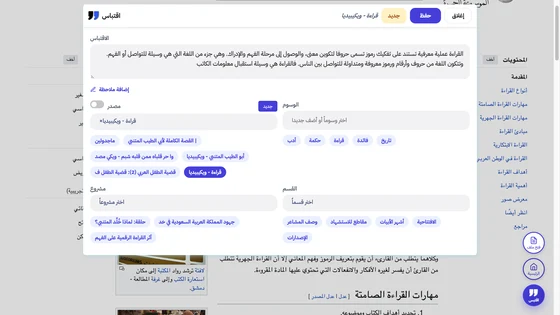
Eqtepas started as a quote-keeping app for readers and researchers, and the Chrome extension (it also runs on Edge and Brave) brings the same idea to the web:
- Highlight and click “Quote from this page” — the line is saved with the page title and link.
- Page won’t let you copy? Select part of it as an image and it becomes text (10 a month on the free plan).
- PDFs — even files saved on your computer — open in the extension’s reader, and every quote keeps its page number.
- A note under each quote so you remember why it mattered.
- APA or Chicago citation for the source, ready to paste.
- One library: web quotes sit next to lines you snapped from paper books in the iOS and Android app.
2. Readwise Reader — best read-it-later app for heavy readers
Reader saves whole articles, newsletters and PDFs into a clean reading app, lets you highlight there, and Readwise emails you a daily review of old highlights. It also pulls in Kindle highlights, which is why many book lovers swear by it.
Watch out for: it’s paid after the 30-day trial, and it isn’t built for academic citations.
3. Glasp — free social highlighting
Glasp lets you highlight in colour on any site and builds a public profile of what you read, so you can see what others highlighted on the same article. Highlighting is unlimited on the free plan, and it adds AI summaries of YouTube videos.
Watch out for: the point is sharing — check what’s public before you highlight anything personal. No citations.
4. Liner — from highlighter to AI research assistant
Liner made its name as a web highlighter, and the extension still highlights and saves. Today, though, the product is built around AI search and writing, and most new features sit in the paid plan.
Good for: people who want an assistant that searches and answers with sources. If you want a tidy archive of your own quotes, that’s no longer Liner’s focus.
5. Weava — cheap, research-friendly highlighting
A simple highlighter that files highlights into folders by project, works on PDFs and includes a citation generator. A solid budget pick for a student writing a paper.
Watch out for: limited storage on the free plan, and nothing for capturing quotes from printed books.
6. Notion Web Clipper — saves pages, not lines
One click sends a page or its link into a Notion database. Great if you collect sources for a topic and then write in Notion anyway.
Watch out for: it doesn’t highlight the line inside the page, so you end up re-reading to find the paragraph you wanted. Many Notion users pair it with a highlighter.
How to quote and cite a web page properly (APA 7)
Saving the line is half the job. The other half is quoting it honestly. This works for any web page:
- Copy the words exactly, inside quotation marks. Mark any cut in the middle with an ellipsis (…).
- Record five things: author (a person or an organisation), date published or updated, page title, site name and URL.
- No date? Write (n.d.).
- Author and site are the same? Leave the site name out.
- Retrieval dates are only needed in APA 7 for pages that change all the time and aren’t archived — a live population clock, a stats page that updates daily.
- In-text, there are no page numbers, so give a paragraph number: (Author, Year, para. 3).
Template: Author. (Year, Month Day). Title of page. Site Name. URL
In-text: (World Health Organization, 2026, para. 3)
U.S. Census Bureau. (n.d.). U.S. and world population clock. U.S. Department of Commerce. Retrieved November 20, 2026, from https://www.census.gov/popclock/
The first example has no site name because the author is the site. The second has no date and changes constantly, so it needs “Retrieved … from”.
The same habit — line, source, page — matters for books too: see how to annotate a book and how to summarize a book.
Which one should you pick?
- Students and researchers: Eqtepas (free, citations, PDFs with page numbers) or Weava on a budget.
- Heavy article readers: Readwise Reader if the subscription fits; Glasp if you want free.
- Notion people: a highlighter for lines, the Web Clipper for pages.
- Readers who also read paper books: Eqtepas, so web quotes and book quotes end up in one place — see how to remember what you read.
Try it on the article you’re reading right now: highlight one line and save it with its source. Create a free account, then add Eqtepas to Chrome.
FAQ
What is the best Chrome extension to save quotes?
For saving the exact line with its source and a ready APA citation, Eqtepas (free). For a read-it-later library with daily highlight reviews, Readwise Reader (paid). For free social highlighting, Glasp.
How do I save text from a website?
Install a quote-saving extension, highlight the text and click save — the line is stored with the page title and URL. If the page blocks copying, capture that part as an image and convert it to text. Copy-pasting into notes usually loses the source.
How do I highlight web pages in Chrome?
Chrome doesn’t keep highlights on its own, so you need an extension such as Eqtepas, Glasp or Weava. Select text on the page and choose highlight or save; your highlights stay in your account after you close the tab.
How do you cite a web page in APA 7?
Author. (Year, Month Day). Title of page in italics. Site Name. URL. Use (n.d.) if there is no date, drop the site name when it matches the author, and add a retrieval date only for pages that change constantly.
Keep the lines you love — with the page number
Eqtepas saves quotes from paper books (snap the page), PDFs, ebooks and the web, each one with its book and page — then turns any of them into a shareable card.
Try Eqtepas free